Build Your Own ManyChat for $0
▶ Read as storyYou commented BUILD, so here is everything you need. One prompt, pasted into Claude Code, builds you the same comment-to-DM bot ManyChat sells: someone comments a word on your reel, it replies, DMs them, checks they follow you and sends the link. Mine runs on Cloudflare’s free plan, so it costs $0 and keeps working with my laptop closed.
What it does
The whole flow, from one comment
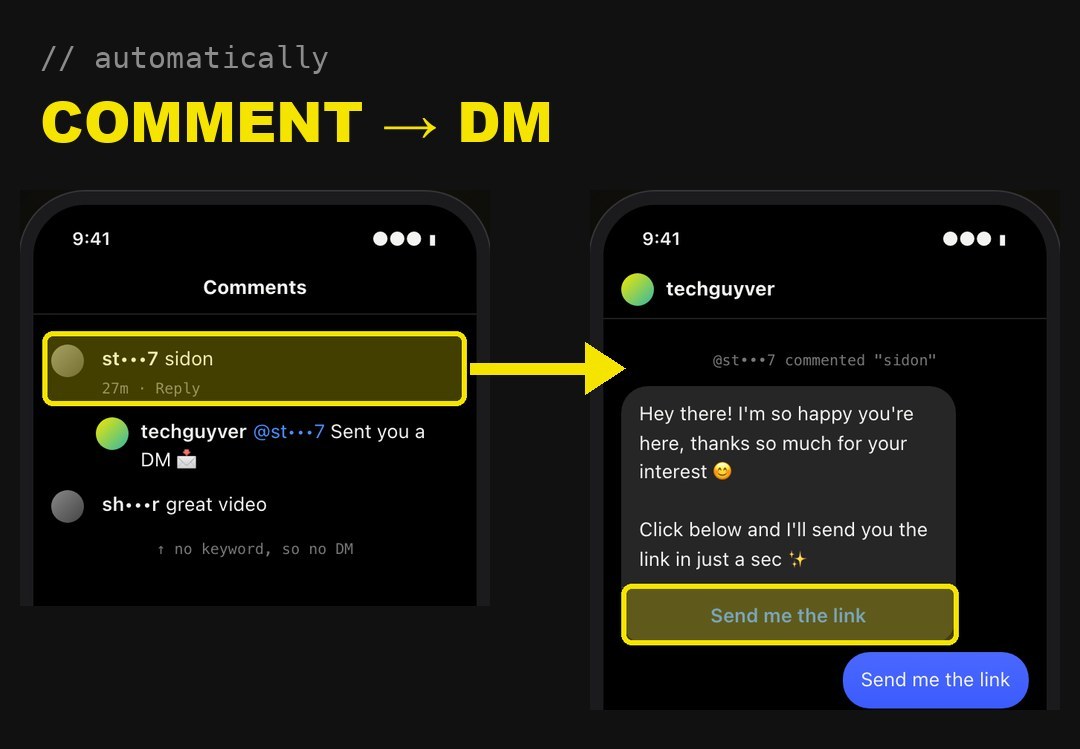
1. Someone comments your keyword on a reel, say BUILD. Any case, extra words are fine.
2. It replies under their comment, rotating short lines like “Sent you a DM” so it never looks like a bot.
3. It DMs them a message with a “Send me the link” button.
4. It checks they follow you. Not following? They get a follow button first, then “I’m following”.
5. It sends the link, and one nudge an hour later if they did not tap it.
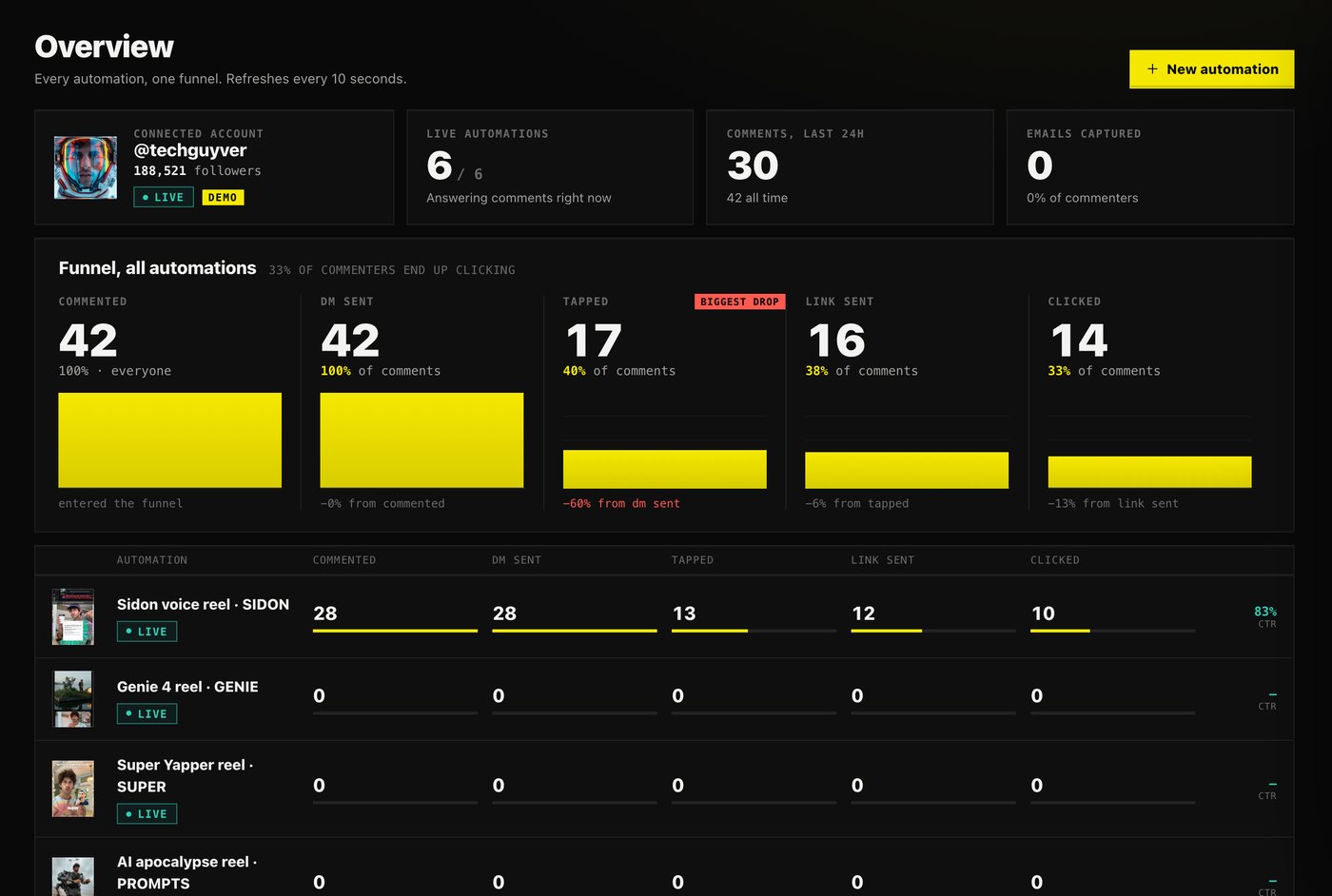
The numbers from my first 3 days
6 reels, all live
- 42 people commented a keyword, 42 got the DM. Nobody waited on me.
- 14 clicked the link, a third of everyone who commented.
- 28 people on one reel, 10 clicks.
- 4 people who commented before the bot existed got their DM the minute it went live.
Why not just pay ManyChat
It bills per person, every month
ManyChat charges per active contact: one person who comments, DMs or replies to your story that month. Five comments from the same person count once. Each plan includes some people, and every person past that is billed extra, automatically.
| Plan | Price / month | People included / month | Each extra person |
|---|---|---|---|
| Essential | $17 | 250 | 10¢ |
| Pro | $39 | 2,500 | 5¢ |
| Business | $99 | 7,500 | 2.5¢ |
| Advanced | $199 | 25,000 | about 0.4¢ |
| Your own bot | $0 | no cap | $0 |
So one reel that 10,000 people comment on costs $414 that month on Pro, not $39.
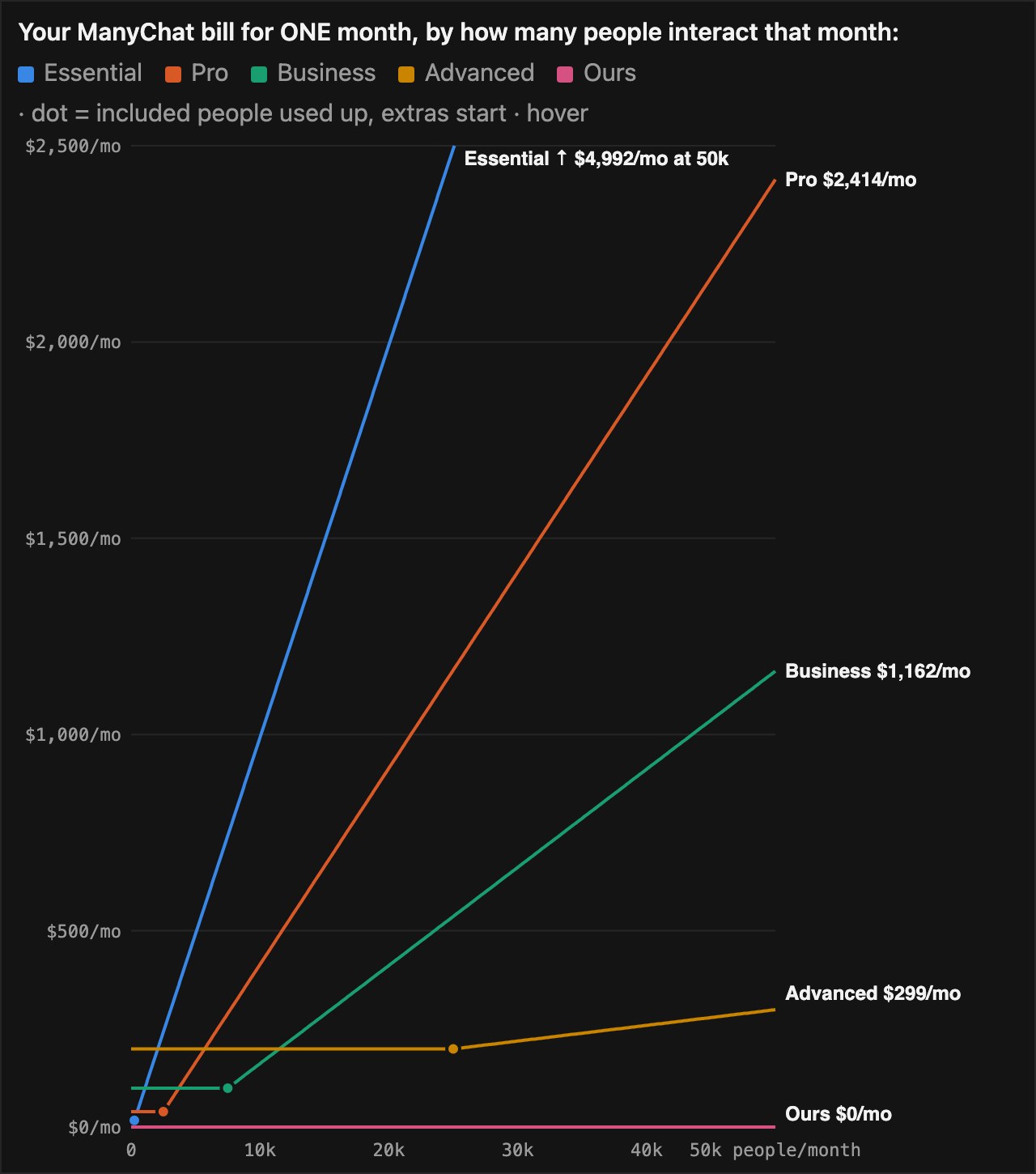
Monthly prices as listed on hyperleap.ai (October 2026). Check manychat.com/pricing for your country.
Before you start
What you need
- Claude Code. It is the AI that writes and sets it all up. Never used it? Start here.
- An Instagram professional account (Business or Creator). Switching is free in the Instagram settings.
- A free Cloudflare account, so the bot runs when your computer is off.
- About an hour, most of it clicking through Meta’s developer site with Claude telling you where.
The prompt
Copy it into Claude Code
Build me my own ManyChat-style comment-to-DM bot for my Instagram account.

When someone comments a keyword on one of my reels:
1. reply to their comment publicly (rotate a few short replies)
2. send them a private reply DM with a "Send me the link" button
3. when they tap it, check they follow me; if not, ask them to follow first with an "I'm following" button
4. send the link as a button
5. if they don't tap within an hour, send one follow-up

Use the Instagram API with Instagram Login (graph.instagram.com) and webhooks for comments, messages and messaging_postbacks. Check the X-Hub-Signature-256 on every webhook.

Run it on Cloudflare Workers with a Durable Object for storage, so it works when my laptop is closed. Add a cron every minute for follow-ups and a weekly token refresh.

Give me a small admin page behind a password: one automation per reel (pick the reel, keywords, messages, link), a phone preview of the DM, a contacts list and a funnel: commented, DM sent, tapped, clicked.

Add a dry-run mode that sends nothing until I add my token, plus /privacy and /data-deletion pages (Meta needs both to publish the app).

Walk me through the Meta app setup step by step and store my keys as secrets, never in the code.
The 6 Meta steps
Claude walks you through these. Here is what each screen looks like
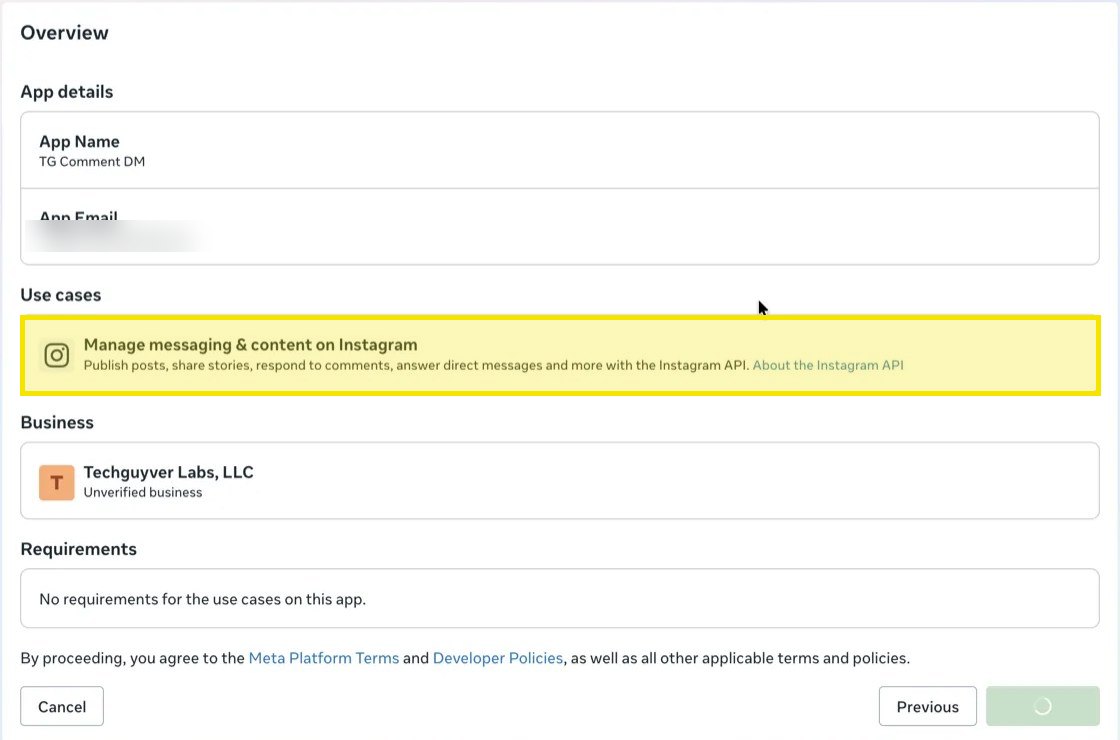
1. Create the app. Go to developers.facebook.com, Create app, pick the use case Manage messaging & content on Instagram.
2. Add your Instagram as a tester. App roles, Add people, pick Instagram Tester (the last option), type your username.
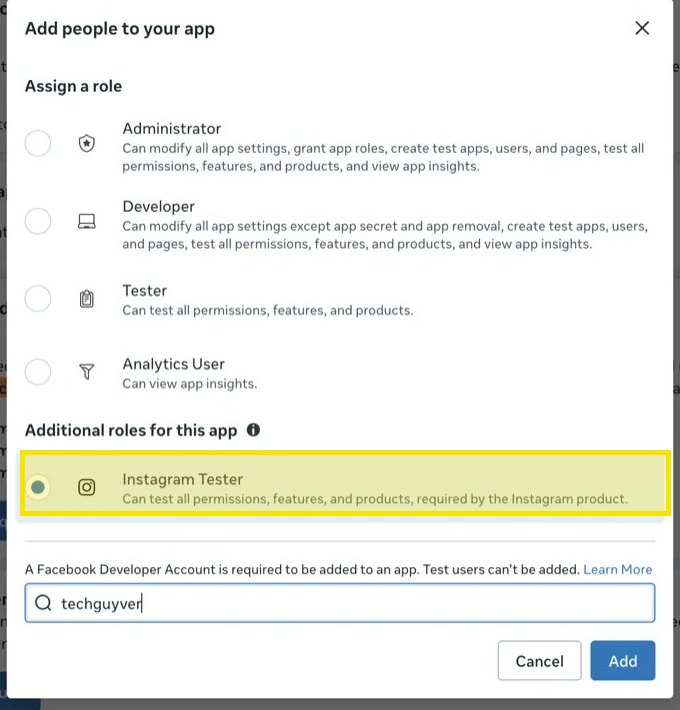
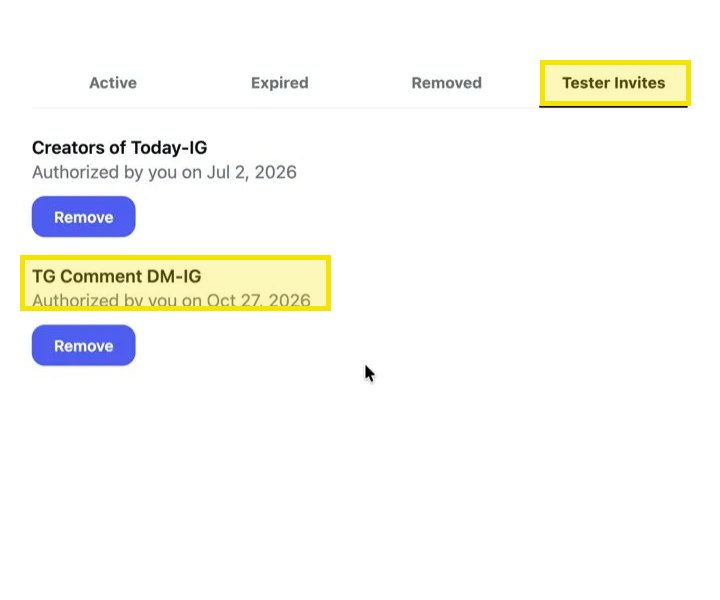
Then accept it on instagram.com: Settings, Apps and websites, Tester invites, Accept.
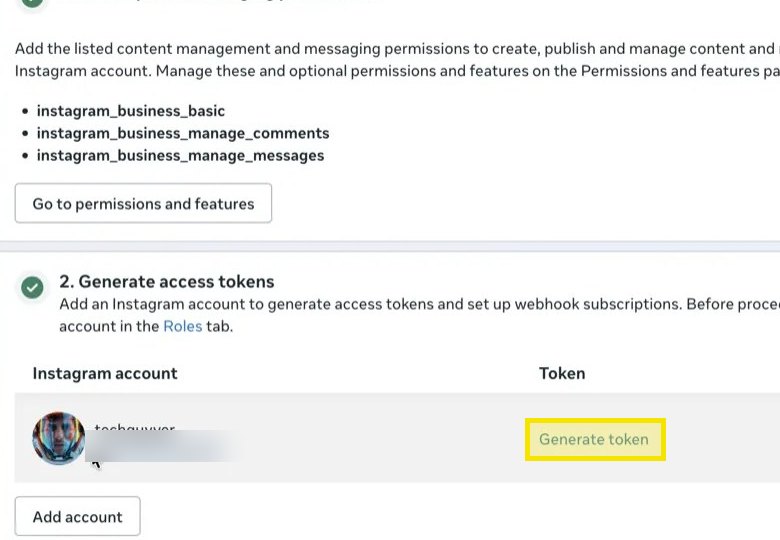
3. Connect your account and generate a token. In API setup with Instagram login, Add account, then Generate token. Claude stores it as a secret.
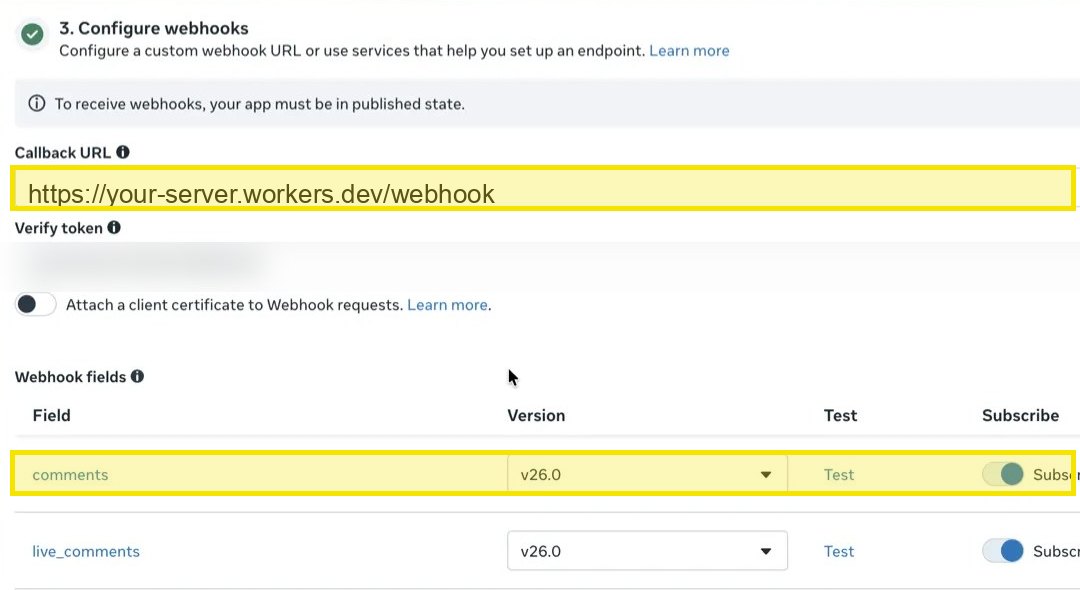
4. Point the webhook at your bot. Paste the address and verify token Claude gives you, then switch on comments and messages.
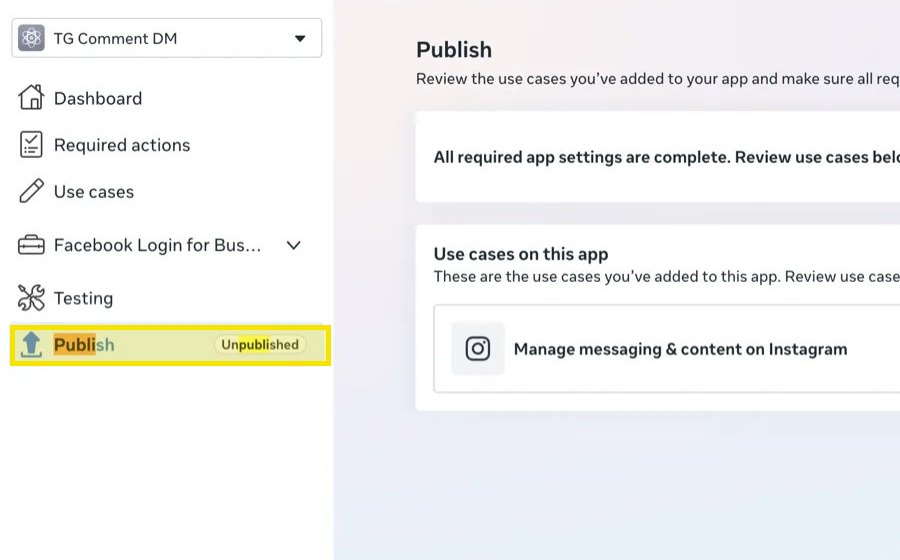
5. Publish the app. Add the privacy and data deletion links first. Instagram sends nothing to an unpublished app.
6. On your phone: Instagram, Settings, Messages and story replies, Message controls, Connected tools, Allow access to messages.
What you end up with
One page to run every reel
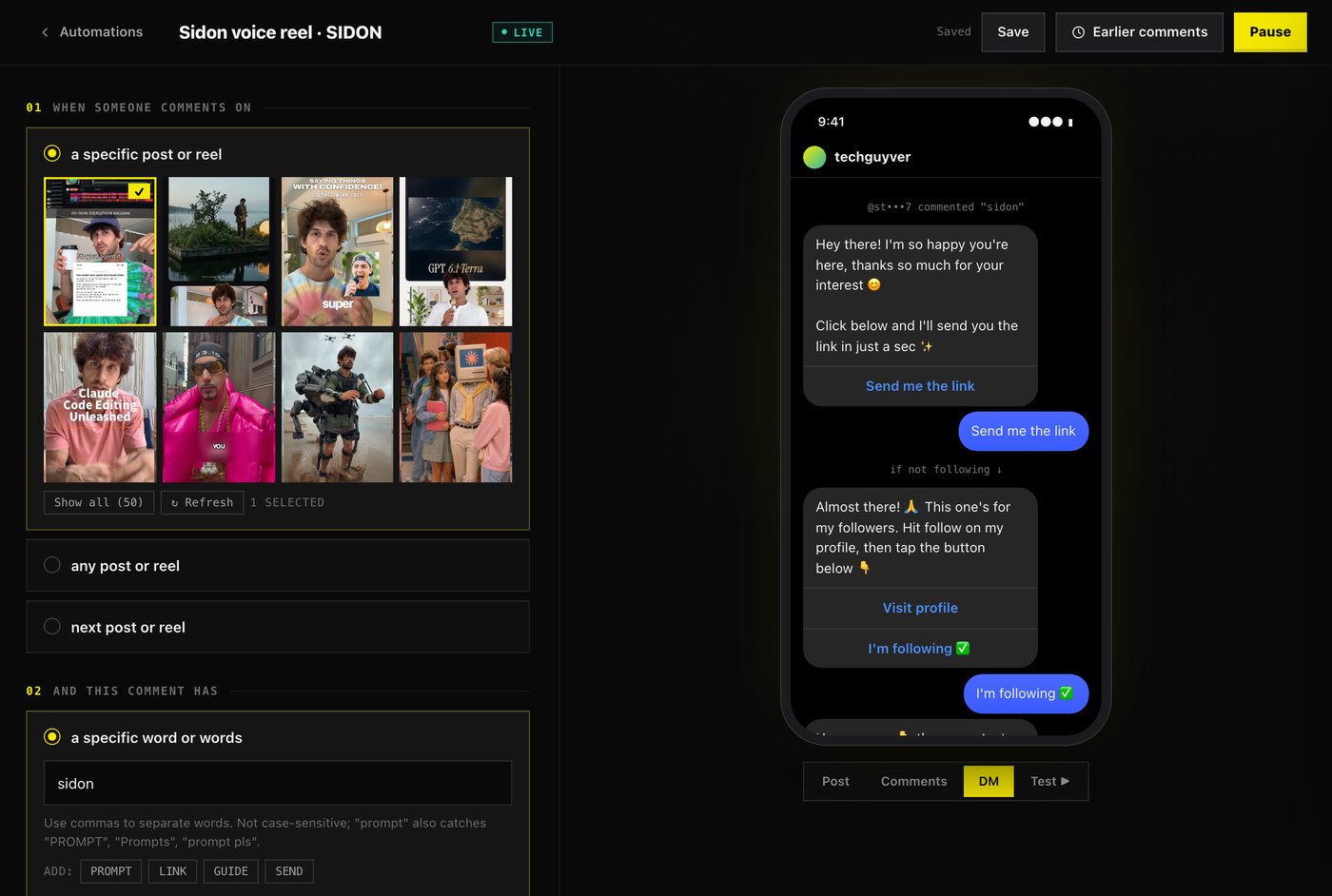
Pick the reel, type the keyword, write the messages, paste the link, press Go Live. The phone preview shows exactly what people will get.
Make it yours
Paste any of these after the first prompt
Reach people who commented before the bot existed:
add an "Earlier comments" button: DM everyone who commented the keyword in the last 7 days and has not had the link yetLock onto the reel you post next:
add a "next post" option: the automation attaches itself to the first new reel that gets the keywordCollect emails:
add an optional step that asks for their email before the link, and a CSV export of everyone who gave oneRecord a clean demo:
add a demo mode switch that masks usernames and emails on every screenGood to know
The rules Instagram enforces
- One private reply per comment, within 7 days of it. After that, you can only message people within 24 hours of their tap or reply.
- Your own comments are ignored. Test from a second account.
- “Add account” does nothing until the Tester invite is accepted. Accept it on instagram.com first.
- Use the Instagram app secret, not the Meta app secret. They sit on different pages and only one verifies the webhooks.
- Liking their comment needs a Facebook login, not the Instagram login this bot uses. Skip it to start.
Why I built it
Every person who comments is someone asking to hear from you. You should own that list, and it should not cost more the better your reel does.
One prompt, one afternoon, $0 a month.