GPT-6.1 Terra Is 10x Cheaper Than Astra
▶ Read as storyGPT-6.1 Terra costs exactly one tenth of GPT-6 Astra per token, and OpenAI says it matches Astra on its computer-use test. You commented TERRA, so here is the full breakdown and how to start using it today.
The numbers
Astra vs Terra
Prices per 1 million tokens, from OpenAI’s model pages (read 2026-10-27).
| GPT-6 Astra | GPT-6.1 Terra | |
|---|---|---|
| Input | $10 | $1 |
| Cached input | $1 | $0.05 |
| Output | $50 | $5 |
| ChatGPT credits (in / out) | 250 / 1,250 | 25 / 125 |
| Plus plan, local messages per 5 hours (estimate) | 5 to 45 | 35 to 285 |
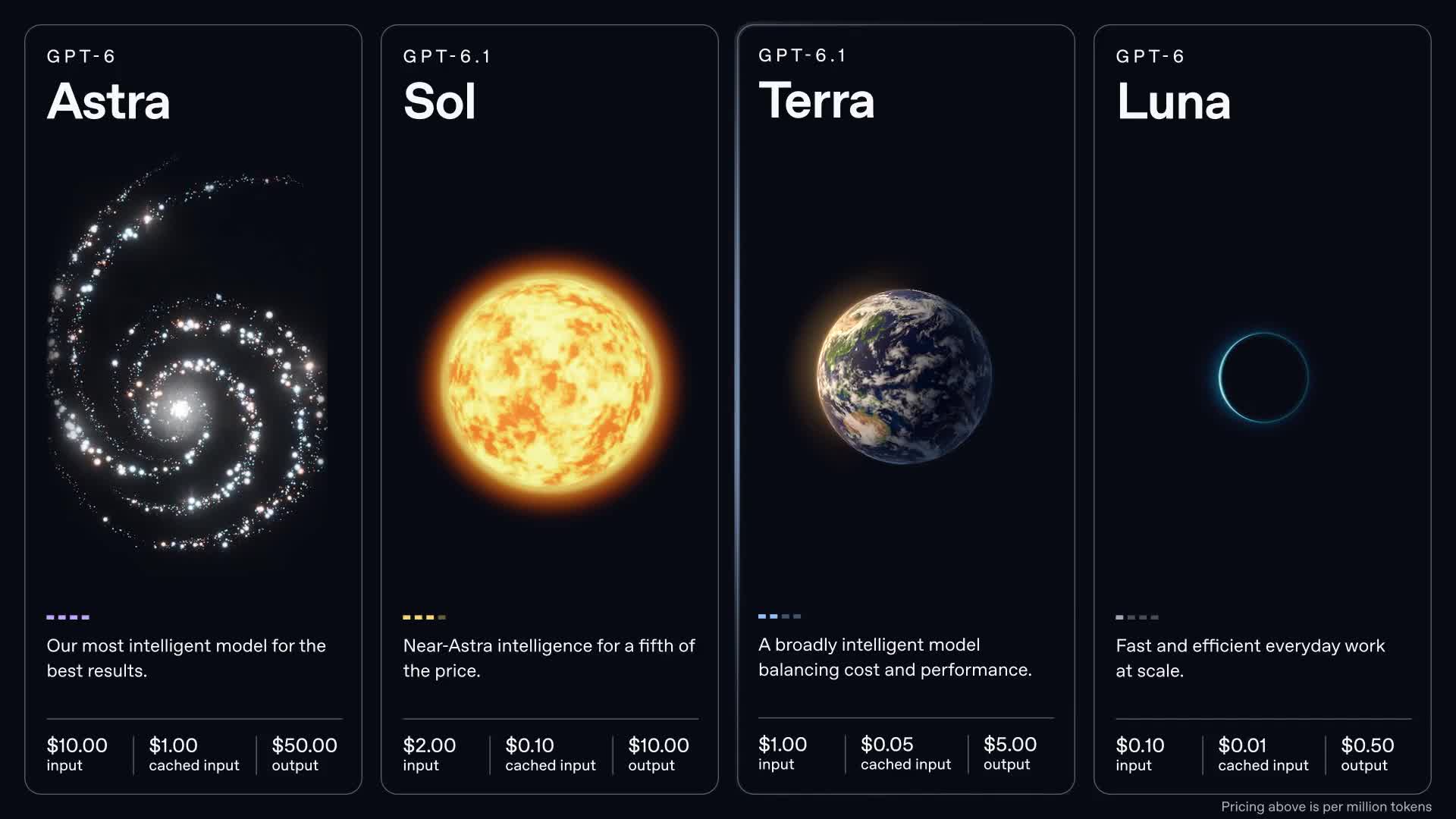
OpenAI’s price cards, from its launch video.
What OpenAI says Terra does
The claims
- Same score as Astra on Agents’ Last Exam, OpenAI’s computer-use test, “at one-tenth the price per token”.
- Over 3x faster. OpenAI says Terra finishes tasks over 3x faster on average than both Astra and GPT-6.1 Sol.
- Up 15 points on the same test versus GPT-5.6 Terra, at about one third of the cost.
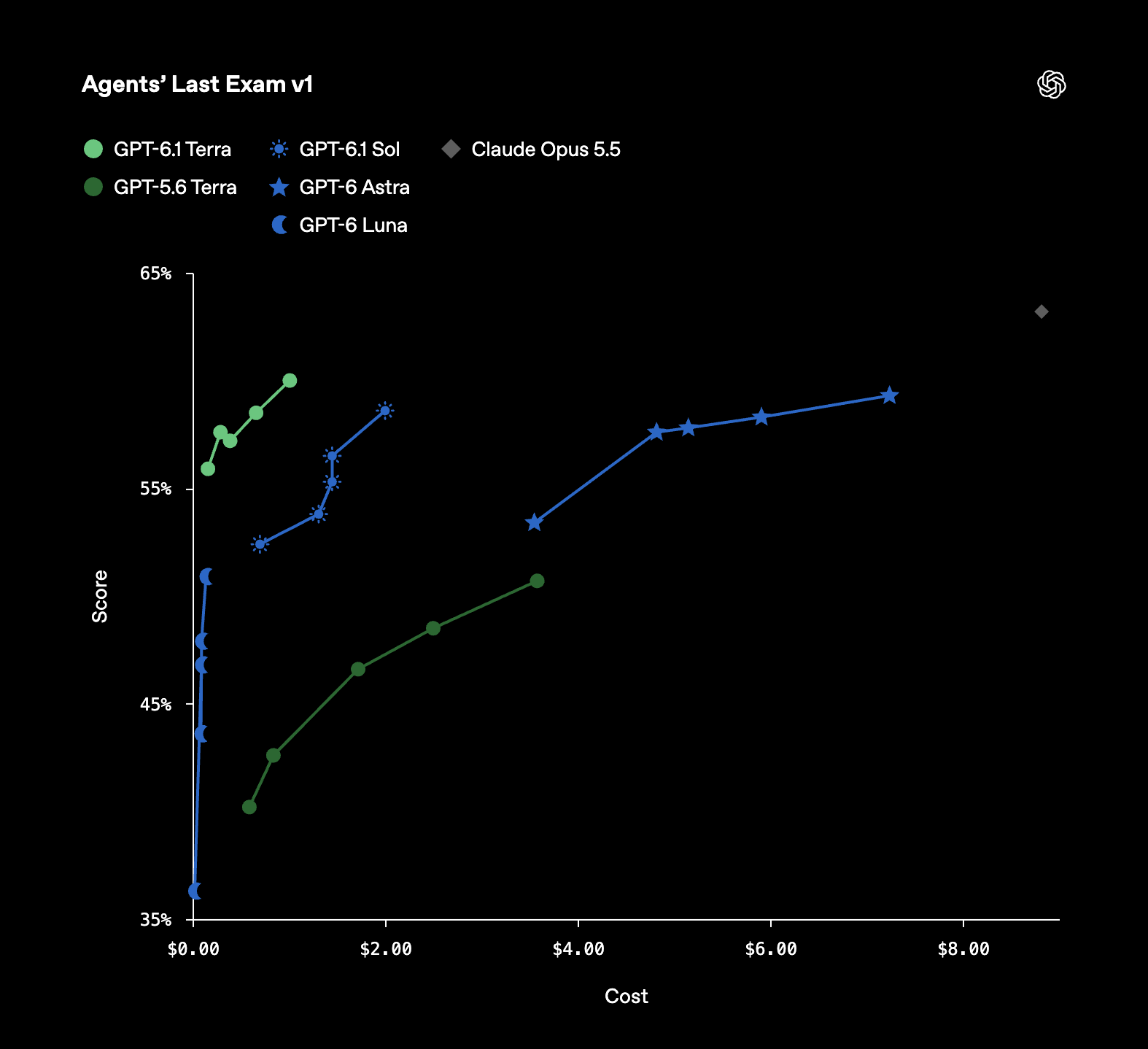
OpenAI’s chart: score up, cost per task to the right. Terra sits top left.
Why the price is the story
Computer use
Computer use means the AI looks at your screen, clicks, types and finishes the job. OpenAI’s own examples are filling out forms, testing user flows and completing tasks inside an app.
Lots of work apps have no API. An AI that can use the screen can work in almost any of them. Think 3D modeling, technical drawings, Excel, video editing and long application forms.
Astra proved it works. The cost was the catch. Plus users reported hitting limits fast, and OpenAI shipped a fix and reset usage after the launch. An agent you cannot leave running is not much help. At a tenth of the price it becomes something you can.
How to use Terra
What you came for
- Pick where. Terra is in ChatGPT Work and Codex on Plus, Pro, Enterprise and Edu plans, and in the API as
gpt-6.1-terra. It is not in regular Chat. - Start with a boring, repeatable job. A form you fill every week, a spreadsheet clean-up, a checklist you click through in one app. Small jobs show you what it gets right before you hand it anything big.
- Use Terra for the long runs. Computer use sends a lot of screenshots and steps, which is where the 10x price difference adds up.
- Switch up when it matters. OpenAI itself says Sol and Astra remain the better pick for complex coding and deep research.
- Watch it work the first few times. OpenAI’s computer-use guide says to treat what is on screen as untrusted and to confirm purchases or destructive actions yourself.
The honest caveats
Before you get excited
- “Astra-level” is one test, run by OpenAI. Wait for independent results.
- 10x is per token. On a Plus plan the estimate is about 6x more messages (35 to 285 vs 5 to 45), not a clean 10x.
- Your allowance does not grow. OpenAI says overall Work and Codex plan limits are unchanged. Terra just draws less from them.
- Safety flags. OpenAI’s system card shows Terra with higher rates of some flags, like destructive actions and prompt injection, than Sol and Astra.
When a tool gets cheap enough to play with, that is when the real work starts.
My take
Sources
Where the numbers come from
- Introducing GPT-6.1 Terra, OpenAI
- GPT-6.1 Terra model page and GPT-6 Astra model page, OpenAI
- Computer use guide, OpenAI
- ChatGPT pricing and usage in Work and Codex
- OpenAI on X, 2026-10-27
- Terra system card
What people asked
Questions
What is GPT-6.1 Terra?
OpenAI’s new model that balances cost and performance. It is built for computer use: it reads your screen and takes action across apps.
Is Terra really 10x cheaper than Astra?
Per token, yes. $1 in and $5 out against $10 in and $50 out. Per task and per plan the saving varies.
Can I use Terra in regular ChatGPT?
Not in regular Chat. It is in Work and Codex on Plus, Pro, Enterprise and Edu, and in the API.